I have already started saving my apps data to the /Library folder but in my recent game WARP gce, the "save" files are still in /Documents.
So on your iOS 5 test device go to Settings -> General -> Usage and select an app
We're are still under NDA so these images may go away.
Here's a couple of screenshots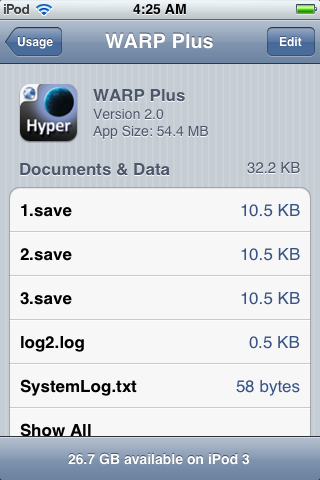
Now let's swipe to delete - YIKES!

Now even in Hyper WARP I have a method to check that the file "is there" before it tries to load it but if you don't, well only YOU know what will happen ;-)
Oh and in the new multi-tasking order of things... you guessed it... you can of course DELETE these files WHILE your app is in the background, which again; only YOU know what problems that will cause.
What can we do / what should we do?
I think giving the user control over the device is certainly the right move and we as developers have always been able to choose which folder to save our files to. From all that I have seen and read the "/Library" folder is "our" folder and the normal user, even with iOS 5 will never "see" in there. So that is where all my "app" files are stored and starting with version 2.0 of WARP gce; so will the saved game files.
Finally time for another code snippet!
Here is my "move" method I'm using in WARP gce
Notations:
playerDefaults is a pointer to [NSUserDefaults standardDefaults]
kDidMoveSavedFiles is a #define macro
-(void) moveSavedFilesToLibrary
{
// only run once kDidMoveSavedFiles
if ([playerDefaults integerForKey:kDidMoveSavedFiles] < 1) {
// documents folder
NSArray *docFilePath = NSSearchPathForDirectoriesInDomains (NSDocumentDirectory, NSUserDomainMask, YES);
NSString *documentsDirectory = [docFilePath objectAtIndex: 0];
// library folder
NSArray *libFilePath = NSSearchPathForDirectoriesInDomains (NSLibraryDirectory, NSUserDomainMask, YES);
NSString *libraryDirectory = [libFilePath objectAtIndex: 0];
// file manager
NSError *error;
NSFileManager *fileManager = [NSFileManager defaultManager];
NSDirectoryEnumerator *direnum = [fileManager enumeratorAtPath:documentsDirectory];
// while variables
NSString *pname;
int fileNum = 1; // my saved game files start with 1.save, next would be 2.save
int scoreNum = 0; // my saved high-score files start with 0.scores for type 0 games, 1.scores for type 1 games, etc
while ((pname = [direnum nextObject])) {
// remove any .txt file <- you perhaps don't want to do this, I did :-)
if ([[pname pathExtension] isEqualToString:@"txt"]) {
[fileManager removeItemAtPath:[NSString stringWithFormat:@"%@/%@",documentsDirectory,pname] error:&error];
}
if ([[pname pathExtension] isEqualToString:@"scores"]) {
NSString *orgFileName = [NSString stringWithFormat:@"%@/%i.scores", documentsDirectory, scoreNum];
NSString *newFileName = [NSString stringWithFormat:@"%@/%i.scores", libraryDirectory, scoreNum];
// move file from Documents to Library
[fileManager moveItemAtPath:orgFileName toPath:newFileName error:&error];
++scoreNum;
}
if ([[pname pathExtension] isEqualToString:@"save"]) {
NSString *orgFileName = [NSString stringWithFormat:@"%@/%i.save", documentsDirectory, fileNum];
NSString *newFileName = [NSString stringWithFormat:@"%@/%i.save", libraryDirectory, fileNum];
// move file from Documents to Library
[fileManager moveItemAtPath:orgFileName toPath:newFileName error:&error];
// check for matching log file
NSString *orgLogName = [NSString stringWithFormat:@"%@/log%i.log", documentsDirectory, fileNum];
if ([fileManager fileExistsAtPath:orgLogName]) {
NSString *newLogName = [NSString stringWithFormat:@"%@/log%i.log", libraryDirectory, fileNum];
[fileManager moveItemAtPath:orgLogName toPath:newLogName error:&error];
}
++fileNum;
}
}
// now update NSUserDefaults so this will never run again!
[playerDefaults setInteger:2 forKey:kDidMoveSavedFiles];
}
}
Update: I'm working on adding analytics and guess what shows up...

Which of course is NOT a problem because those of you that are already using Google Analytics of course complied with the terms and notified your users... right?

